

Being a Crush Live agent in 2026 is an excellent opportunity for anyone skilled at recruiting and managing people. However, we know the Crush Live agency registration process can seem confusing to some people, so we’ve created this guide to make it simple! By the end, hopefully, you’ll be ready to create your own agency. But first, let’s review the requirements to ensure you have everything you need.
Crush Live Agency Registration Requirements
To ensure your registration process is easy, we have provided you with a simple checklist. Other than your typical requirements, such as working internet connection and have fairly recent smartphones, you also need to:
1. Save Crush Live Download & Agency Link
On Crush Live, we have a specific download link for anyone who wants to join as an agent! Open or bookmark this link right here.
Then, later in the tutorial, you will have to use this agency registration link right here. Don’t forget to bookmark it first!
2. Have Active Phone Number, Gmail, or Email
This is your usual requirement needed for account registration. Just make sure you have full access to it, we do not recommend you using someone else’s number or email account.
Crush Live Agency Registration Step-by-step
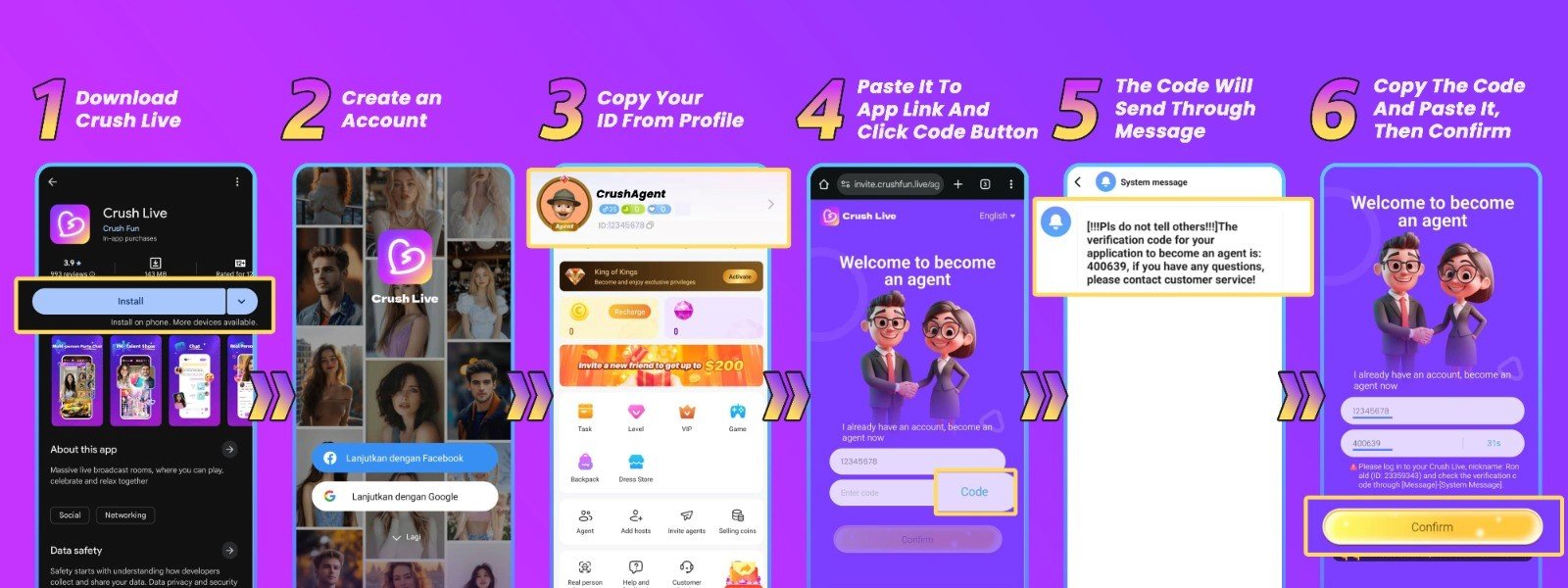
Open the Crush Live download link
First, open the bookmarked link or scroll up to the download link we mentioned earlier. At the bottom of the page you will see a ‘Download’ button, if you do, click the button. You will get redirected to either App Store or Play Store to install the app.
2. Sign up your account
Once the app is installed, sign up using your preferred method. However, we recommend you to use either Gmail or phone number for an easier registration process.
On this step, a verification code will be sent to your phone email or phone number. You need to enter the code into the appropriate field to proceed. Also, we recommend you to use a nickname, instead of your real name for privacy purposes.
3. Get your Crush Live ID
To find your Crush Live ID, go to your profile. You will see a number under your username. Click the copy icon next to this number to copy your Crush Live ID for the next step.
4. Open the Agency Registration link
Now, open the second link we mentioned earlier. There you will see two fields. Paste your Crush Live ID into the first field and click the ‘Get’ button to receive a verification code.
5. Get the verification code
You will receive this code on your Crush Live app (not via email or phone number). To find the code, open the ‘Message’ menu and click ‘System Message’.
6. Enter the verification code
Finally, simply paste the verification code into the second field, and click ‘Confirm’. If everything is correct, congratulations! You are now an official Crush Live agent!
Common Problems & Solution During Agency Registration
1. Can’t Download the Crush Live App on App Store or Play Store
This may happen when your smartphone is not supported by the app anymore. Consider using different devices with newer operating system versions.
2. Chose Wrong Gender During Registration
Unfortunately, if you chose a different gender than what you intended, it is not possible to change it after registration. You must register a new account using new information.
3. I Haven’t Received Account Registration Verification Code
This may happen when you type in the wrong email or phone number. However, if that is not the case, check your email’s spam folder or try again at a later time.
4. I Haven’t Received Agency Registration Verification Code
This may happen when you type in the wrong Crush Live ID. However, if that is not the case, try to use a different internet connection or try again at a later time.
Crush Live Agency Registration FAQs
1. Can I create multiple agencies?
No. One person can only create one agency.
2. What if I entered the wrong username?
You can change your username after registration in your profile.
3. What if I entered the wrong email during registration?
If you entered a wrong email during registration, the verification code will be sent to that email. To solve this, you can simply register again using the correct email.
4. What if I entered the wrong Crush Live ID during agency registration?
If you entered a wrong ID during agency registration, the verification code will be sent to that Crush Live account. To solve this, you can simply paste the correct Crush Live ID.
5. Can I also live stream as an agent?
Yes, all agents on Crush Live can also do live streams themselves.
Agency Registration Tips
1. Do Not Use Your Real Name
To protect your own privacy, we recommend you to not use your real name. Despite Crush Live’s rules and actions we can take (account suspension or ban), the viewer’s action outside the app is beyond our responsibility.
2. Do Not Impersonate Other People
This action can lead to account suspension and even permanent account ban.
Crush Live Agency Registration is Easy
At Crush Live, we believe that registration should be easy, and accessible to anyone who wants to join at any time. We give you freedom and flexibility to create your own agency whenever you’re ready. Now that you have your own agency, why don’t you start exploring the app and discover all the beautiful and talented hosts who could join your agency?
If you’re curious on how other people can join Crush Live as a host, you can check out our other guide right here! And if you have more questions about Crush Live agency, please don’t hesitate to contact our team.