

Welcome to Crush Live! Thank you for your interest in joining our live streaming platform. Crush Live is an ideal live streaming platform for you who wants to share their talents with a community who supports each other. So, to welcome you into our platform, let’s start with a complete Crush Live host registration tutorial . In this tutorial, you will find how easy it is to register on Crush Live. We will also answer any common problems you might encounter during the registration.
Requirements for Crush Live Host Registration
Before we start, let’s make sure that you meet or have the requirements below to ensure a smooth registration process:
- Access to Google Play Store or App Store
- Invitation Code (23359343)
You can copy or save the code first, we will use it in the following section.
How to Register as a Crush Live Host
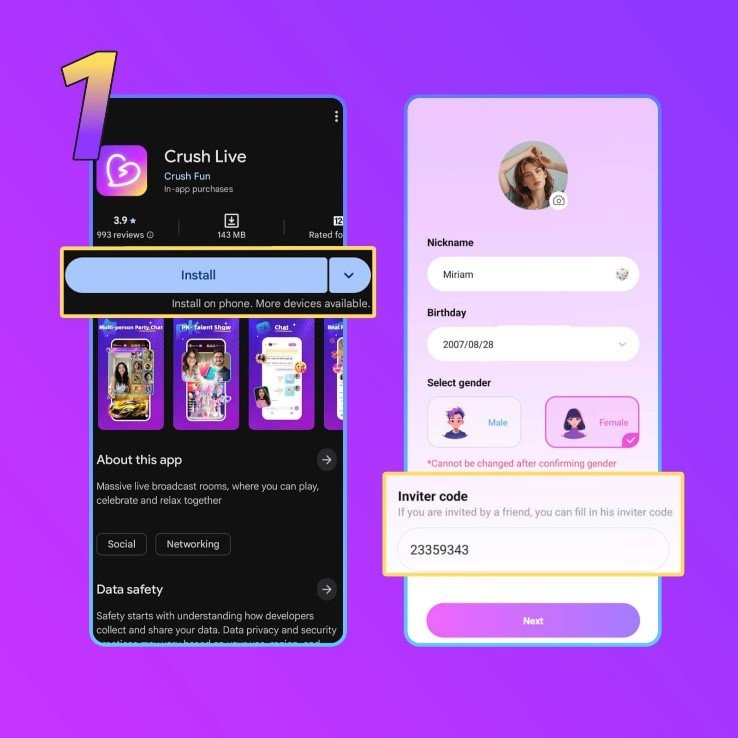
1. Download the Crush Live app
First, open our referral link right here. In there you will see a ‘Download Now’ button, if you do, click it. The button will redirect you to either Play Store or App Store, depending on what kind of smartphone you have. Then, install the app.
After you’ve installed the app, register using your preferred method. You can register using your Facebook, Gmail, email, or phone number. Next, you need to enter your information.
During this process, as you can see on the image below, you need to enter your nickname, date of birth, and invitation/agent code. But, please remember to use a nickname, not your real name, upload your real picture, and use our invitation code 23359343. If you do not see a form to enter an invitation code, please move right onto the next step.
After you’ve filled in all the information, click ‘Next’ to move onto the next step.
2. Go to Your Crush Live Profile
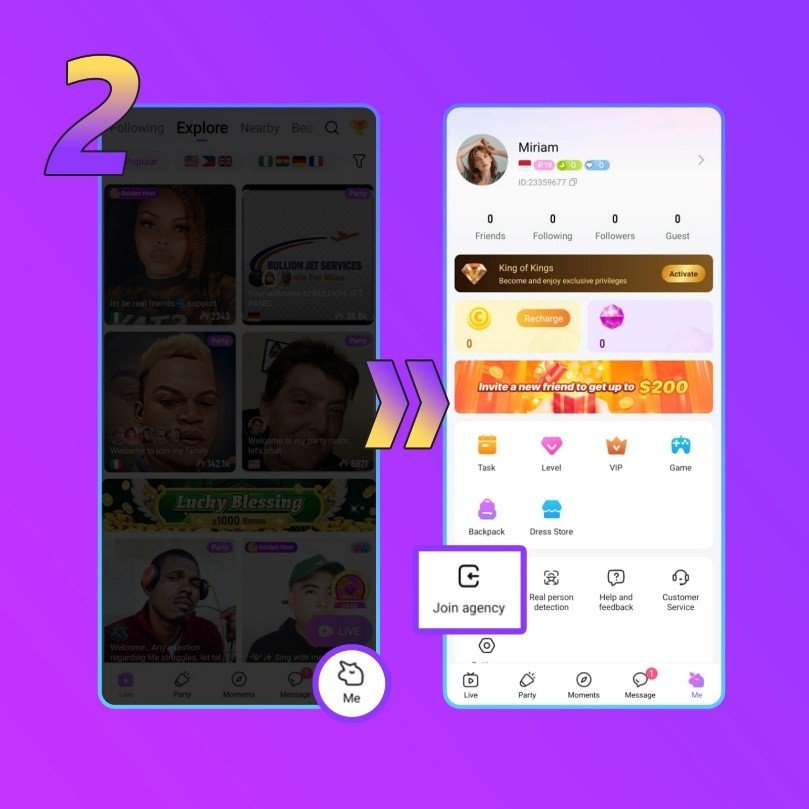
Now, open your profile by clicking the ‘Me’ button on the bottom right corner. Next, you need to click the ‘Join agency’ button.
3. Join the Agency with the Code
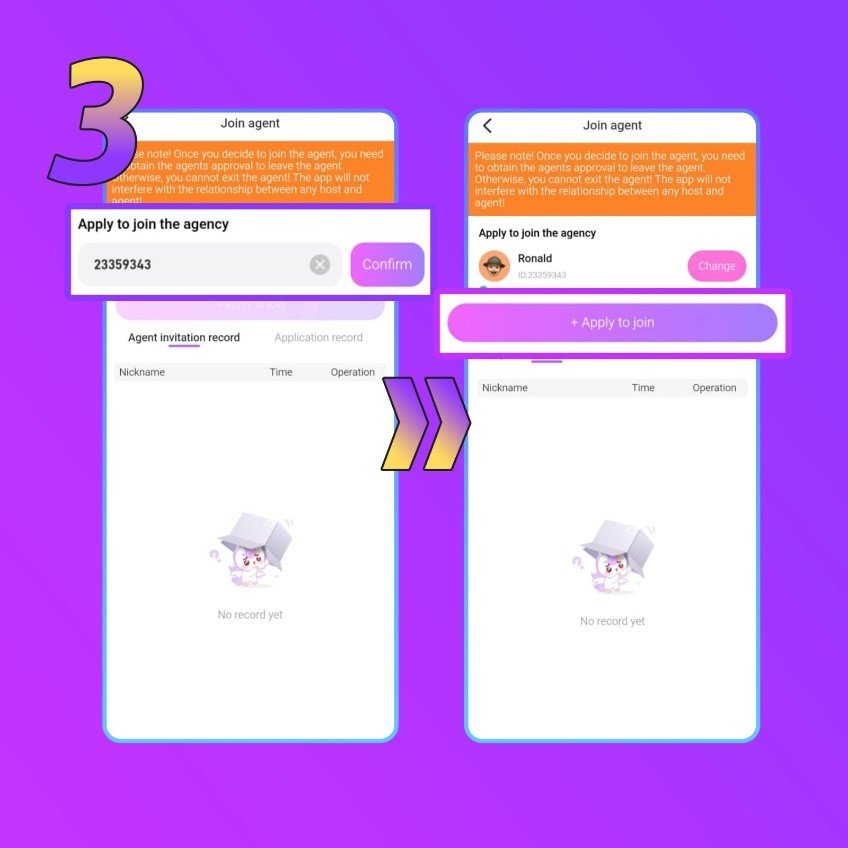
Now is the time to enter the code (23359343), and click ‘Confirm’ to verify it. The result should match the image below. Once verified, click ‘Apply to join’ for the next step.
4. Read and Confirm the Notice
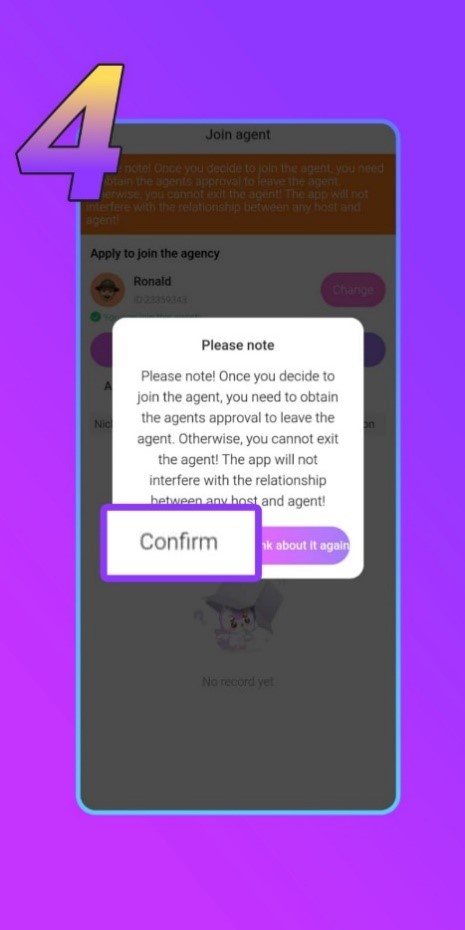
A notification will then pop out. Read it carefully and make sure to understand each point before registering to the agency. Press ‘Confirm’ if you have read and understood it.
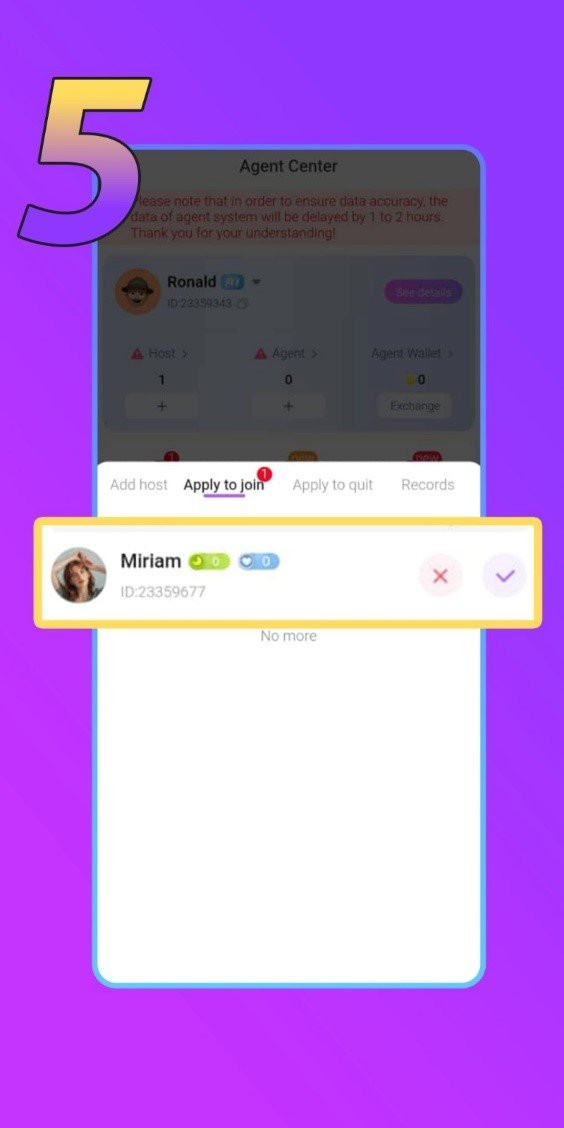
5. Wait for Crush Live Approval
Lastly, you must wait for an approval from the agent who invited you. On the agent’s side, their app will look like the image below. Once approved, it means you are now a part of our agency!
Crush Live Host Registration Problems & Solutions
During this host registration process you may encounter a few problem such as:
1. Invalid Agency Invitation Code
This is a problem that often happens to some people during registration on Crush Live. This problem might occur when the code you entered has more (or less) number, it might have a character or symbol typed in, or maybe it is simply a wrong code. Remember, our code is 23359343.
2. Join Agency Request Denied
If your request to join our agency is denied, you might’ve missed a few important points of the tutorial. For example, you used your real full name, or uploaded another person’s photo. The former is not allowed to protect your privacy, and the latter counts as an impersonation, which is against Crush Live’s rule.
3. Chose Wrong Gender During Registration
Unfortunately, if you chose a different gender than what you intended, it is not possible to change it after registration. You must register a new account using new information.
4. Registration Link is Not Working
Please ensure that you’re using the right link. Our registration link can be used for either iOS or Android.
5. Failed to Upload Photo During Registration
During registration, we recommend you to upload a photo without any filter or edit on it. After the registration is finished, you can then update your profile photo with the one that has a filter or edit on it.
Host Registration FAQs
1. Is there a basic salary system on Crush Live?
Yes. If you have achieved a ‘Crush Golden Host’ status, you will get basic salary everyday.
2. What if I entered the wrong username?
You can change your username after registration in your profile.
3. What if I entered the wrong email?
If you entered a wrong email during registration, the verification code will be sent to that email. To solve this, you can simply register again using the correct email.
4. Why haven’t I received the verification code?
This may happen when you type in the wrong email or phone number. However, if that is not the case, check your spam folder. Then, if the issue persists, try to use a different internet connection and try again later.
5. Can I register more than one host account on one device?
No. You can only register one account on one device.
6. Can other people or I screen record the application?
No. To protect everyone’s privacy we disable the ability to screen records at any time.
Tips for Successful Crush Live Registration
1. Upload Your Best Selfie Picture
Use proper lighting, makeup, or filters to better enhance your profile picture. This also means, avoid uploading a profile picture that has your face obscured, blurred, or heavily edited.
2. Do Not Use Your Real Name
To protect your own privacy, we recommend you to not use your real name. Despite Crush Live’s rules and actions we can take (account suspension or ban), the viewer’s action in the app is beyond our responsibility.
3. Do Not Impersonate Other People
This action can lead to account suspension and even permanent account ban.
Conclusion
The Crush Live registration process is very easy to follow, and if you’ve read this far, we hope you understand this tutorial or have finished the host registration process on Crush Live without a problem. Now you can explore the app to see how a host works on our platform!
However, before you can start your own live stream you must finish the face verification process. To do that, you can follow our other tutorial right here. If you have any other questions regarding the registration process, becoming a host, or anything, don’t hesitate to contact our team!